
Decision guide
Document management system on Microsoft 365: how to choose it
You are already paying for the foundation: SharePoint Online stores, versions and secures your documents. The real decision is what goes on top — structure for everyday work, or governance your auditors will accept. This guide separates the two.
What a document management system actually covers
A document management system (DMS) governs the full lifecycle of a company's files: where they are stored, who can see and edit them, how versions are tracked, which approvals a document needs before it is published, and how long it is kept before retention rules apply. On Microsoft 365, the storage, versioning and permissions layer is SharePoint Online — every company already has it, whether or not anyone has configured it as a DMS.
The question worth asking is not "do we need a DMS" — if files exist, some document management is already happening, badly or well. The real question is which of the three layers below your company is missing: the foundation (which you already have), the everyday structure (which most companies get half right), or the governance layer (which only regulated workflows actually require).
Why "just use SharePoint" is both right and incomplete
SharePoint Online genuinely provides the hard parts of document management: document libraries, version history, metadata columns, co-authoring, granular permissions and a search index. For a lot of companies, that is enough — once the libraries are organized and someone has decided what metadata to require. What SharePoint does not provide out of the box is curation: nobody automatically names folders sensibly, retires outdated files, or enforces that a policy document goes through review before it is marked final. That is a structure and process problem, not a platform limitation, and it is usually solved with an intranet layer on top rather than a SharePoint migration.
When governance stops being optional
For most teams, structure is the whole job: agreed libraries, clear metadata, a navigable home. But pharmaceutical SOPs, healthcare protocols, ISO-certified manufacturing procedures and public-sector records answer to a different standard — an auditor does not ask "is the file somewhere safe," they ask "can you prove who approved this version, who read it, and when the previous version stopped being valid." That proof requires a governed create-approve-publish-retire lifecycle layered on top of SharePoint, with mandatory approvals and read confirmations baked in — not a bigger document library.
What AI changes, and what it does not
The manual, repetitive parts of document governance — classifying a new upload, routing it for the right approval, chasing someone who has not confirmed they read a policy update, flagging a document whose review date has passed — are exactly the kind of tasks AI now handles more consistently than a rotating list of people with other priorities. What does not change is the underlying requirement: a reconstructable record of who did what and when. Automation enforces that record more reliably; it does not replace the need for one.
The framework
Storage is solved. Choose structure and governance.
On Microsoft 365, a document management system is three layers. The first one you already own.
1. The foundation: SharePoint Online
Document libraries, versioning, metadata, permissions, co-authoring. It ships with your Microsoft 365 licenses. What it looks like in practice — and where it stops — is covered in our guide to SharePoint document management.
2. Structure for everyday work
Libraries nobody can navigate are where documents go to disappear. The intranet layer adds document areas, curated navigation and approval flows on top of SharePoint — plans and pricing on the DMS pricing page.
3. Governance for regulated industries
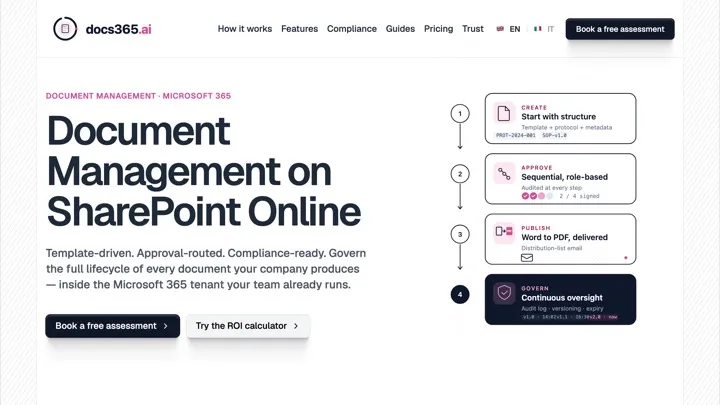
Pharma SOPs, healthcare protocols, ISO procedures and public-sector records need a governed create-approve-publish-retire lifecycle with read receipts and audit trails. That is document governance for regulated industries on SharePoint — docs365, built by our group on the same foundation.
Explore docs365
Document governance built on SharePoint: controlled approvals, read receipts and audit trails for pharma, healthcare, ISO and public-sector teams.
Why it matters
Storage answers 'where is it?'. Governance answers 'can you prove it?'
The two get conflated constantly — and AI is changing what the second one costs.
Compliance teams don't need more storage — they need proof
A SOP sitting in a library proves nothing on its own. What an auditor actually asks is: who approved this version, who read it, and when did the previous version stop being valid. That is a governed lifecycle — create, approve, publish, retire — layered on top of storage, not a bigger library.
AI is becoming compliance's ally, not its risk
The instinct is to worry that AI in a regulated environment adds risk. In practice, the manual parts of governance — classification, routing for approval, chasing read confirmations, flagging an expired version — are exactly the repetitive tasks AI handles more consistently than a rotating cast of people with other priorities. The audit trail itself is not replaced; it is enforced more reliably.
Traceability is the requirement that doesn't move
Whatever automates the workflow, a regulator's question stays the same: can you reconstruct who did what, and when. That is why document governance tools are built on top of SharePoint rather than replacing it — the underlying record and its history have to survive any layer added above them.
The alternatives
Three starting points, three different moves
The right document management setup depends on the problem you actually have today.
Documents are scattered across Teams, OneDrive and email
You need the structure layer: agreed libraries, metadata that people actually fill in, and an intranet home where every department knows where its documents live. Start from the document management features of the intranet.
An audit or certification is coming
Storage is not the issue — proof is. Controlled approvals, versioned SOPs, read confirmations and retention become mandatory. Compare what docs365 covers for compliance teams before building custom workflows that auditors then have to trust.
See docs365 pricing for compliance teams
Compare plans before building custom approval workflows an auditor will have to trust from scratch.
Files are governed, but answers are not
If people cannot find the procedure even though the PDF is filed correctly, your gap is on the knowledge side, not the document side. See our decision guide to the knowledge management system on Microsoft 365.
Document management system — FAQ
What is a document management system?
A document management system (DMS) governs the lifecycle of company files: where they are stored, who can access them, how versions and approvals work, and how long documents are retained. On Microsoft 365 the storage and versioning foundation is SharePoint Online; what you add on top depends on how much structure and governance your industry requires.
Is SharePoint a document management system?
SharePoint provides the core DMS capabilities — document libraries, versioning, metadata, permissions, co-authoring and search. For many companies that is enough, once libraries and navigation are structured properly. Regulated industries usually need a layer on top: controlled create-approve-publish workflows, read receipts, audit trails and retention policies that raw SharePoint does not enforce by itself.
When is SharePoint alone not enough for document management?
When compliance requires proof, not just storage: pharmaceutical SOPs, healthcare protocols, ISO-certified manufacturing procedures, legal and public-sector records. In those cases documents need a governed lifecycle — mandatory approvals, distribution with read confirmation, periodic review — which is the job of a document governance product built on top of SharePoint.
How is a document management system different from a knowledge management system?
A DMS governs files; a knowledge management system governs answers — procedures, decisions and know-how, regardless of the file they live in. The two overlap but are chosen separately. If your problem is finding and maintaining answers rather than governing files, start from the knowledge management side.
Bring structured document management to your Microsoft 365
intranet.ai adds document areas, navigation and approval flows on top of SharePoint — live in 24 hours. For regulated-industry governance, our group's docs365 completes the picture.
Video tour
Want to see intranet.ai in 5 minutes?
An interactive product tour. No form, no appointment.