Microsoft has announced a change affecting all organizations still using SharePoint Online in its Classic version. The stated goal is to reduce the security and governance risks tied to older customization models, pushing companies toward the modern SharePoint experience, designed to be more secure, easier to administer, and mobile-ready.
The retirement path follows two distinct phases, with dates already set, and involves Classic publishing sites, user-created pages, and custom scripts. This isn’t a sudden change, since Microsoft leaves a couple of years’ window before the effects become irreversible, but that’s exactly why it’s worth starting to think about it now, especially if your intranet still carries the legacy of years of accumulated customizations.
What you'll find in this article
The deadlines Microsoft has set for saying goodbye to SharePoint Classic
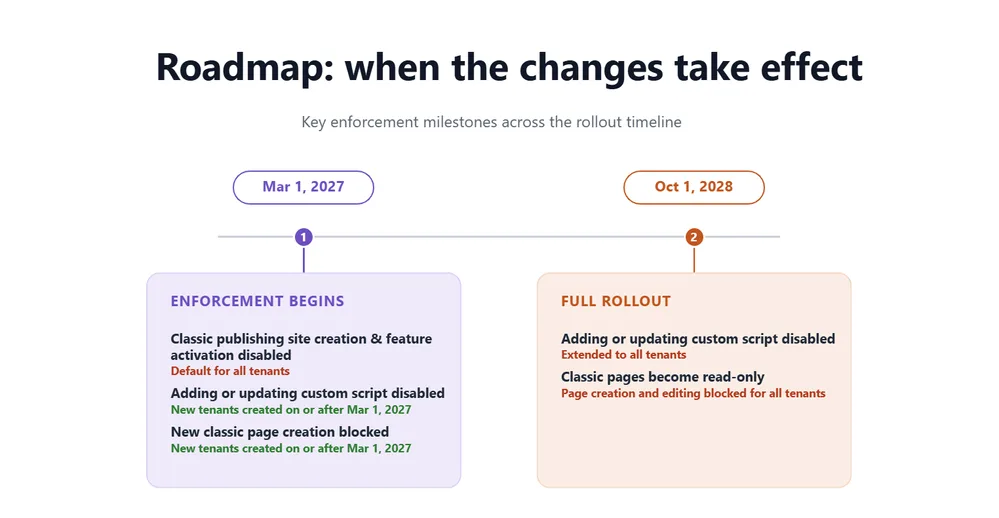
Phase 1, from March 1, 2027
From this date, on all tenants it will no longer be possible to create new Classic publishing sites, whether as site collections or subsites. Likewise, it will no longer be possible to enable the Classic publishing feature where it isn’t already active. The tenant setting that allows the creation of these sites will be permanently blocked.
For tenants created from March 1, 2027 onward, the restriction is broader, since users won’t be able to create new Classic pages at all, and adding or editing custom scripts will be disabled by default.
Phase 2, from October 1, 2028
From October 1, 2028, the restrictions introduced in the first phase extend to all existing tenants, including those that have been active for years. User-created Classic pages become read-only, meaning it will no longer be possible to create new ones or edit existing ones. Here too, the ability to add or update custom scripts will be disabled.
Microsoft clarifies that pages remain accessible for viewing even after this second deadline, a detail worth highlighting because it removes the anxiety of deletion, but it doesn’t reduce the urgency of planning, since a page that can no longer be edited effectively stops being useful as an internal communication tool.
See intranet.ai in action
A ready-to-use intranet on SharePoint Online, live in days. Book a free demo with our team.
Book a demoWhich pages and which environments are affected
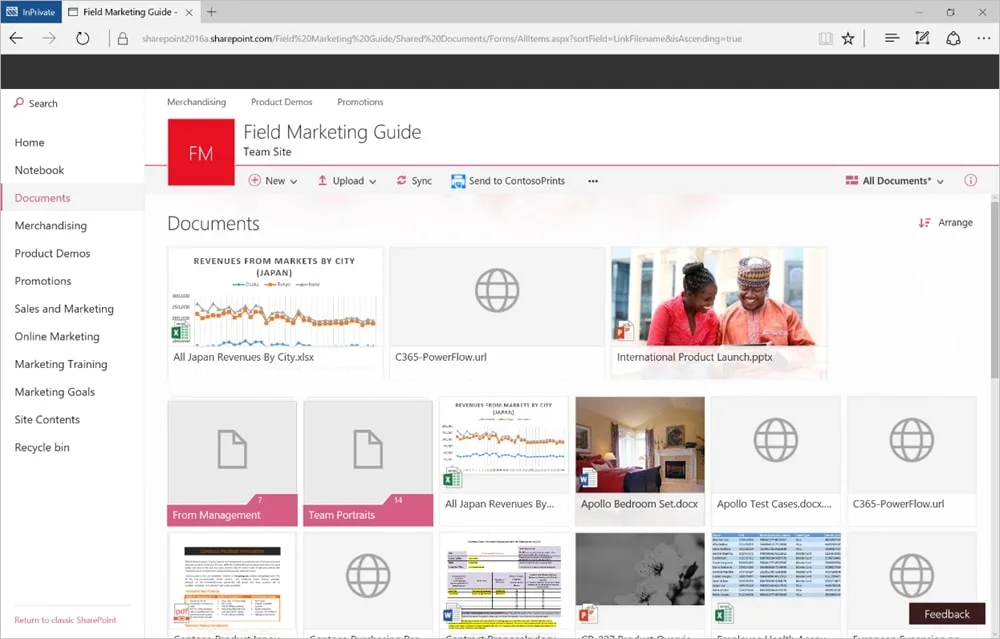
The retirement specifically concerns certain types of user-created Classic pages: wiki pages, web part pages, blog pages, publishing pages, and custom ASPX pages created with SharePoint Designer or third-party solutions. Anyone who works with SharePoint day to day will recognize in this list most of the pages that make up an intranet built with the older approach, the one based on fixed layouts and inserted code rather than configurable web parts.
List and document library views and their related form pages fall outside this scope, although any custom scripts embedded within them are still subject to the new restrictions on script creation and editing. It’s a technical distinction worth keeping in mind when taking inventory: not everything “old” in a SharePoint tenant falls under this retirement, and not everything left out of it is safe from the script rules.
The change applies to all Microsoft 365 environments, including Government ones (GCC, GCC High, and DoD), Office 365 air-gapped environments, and Microsoft 365 operated by 21Vianet. There are therefore no exceptions based on plan type or the organization’s industry.
Why Microsoft decided to act now
Classic pages and legacy customization models rely on server-side rendering and custom scripts, technologies that, according to Microsoft, increase security risk, administrative complexity, and long-term maintenance costs. A site built with custom master pages or scripts added years ago by a vendor who may no longer work with the company eventually becomes something nobody wants to touch for fear of breaking it, and it’s exactly this kind of technical debt that Microsoft wants to reduce.
There’s also a question of innovation speed. The Classic model limits how consistently new features can be rolled out, while the modern SharePoint experience offers a more secure and governed collaboration environment, simpler permission management through Microsoft 365 groups, an interface designed from the ground up for mobile devices, and, looking ahead, the foundation for the most recent artificial intelligence features. Companies that stay anchored to Classic pages therefore risk not only a security problem, but also being left out of this kind of evolution.
Anyone who has already looked into the differences between the two experiences knows this well, because the jump from SharePoint Classic to SharePoint Modern isn’t just about page aesthetics, it also touches permission management, native integration with Teams and Outlook, and the ability to automate workflows with Power Automate, all areas where the Classic model now shows its limits.
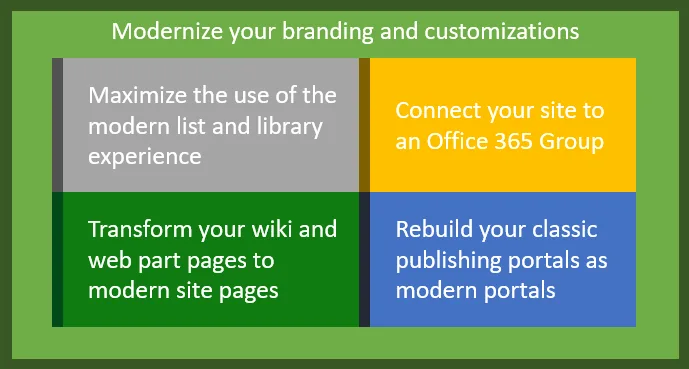
The 4 steps Microsoft recommends to modernize SharePoint Classic
The official documentation suggests a gradual approach, designed to reduce migration risks and give site owners time to validate modernized pages.
1. Identify and assess the existing Classic environment
The first step, and probably the most important, is understanding how many Classic sites and pages are still active in the tenant. Microsoft provides Microsoft Purview audit events in the category dedicated to Classic activities, which cover the creation, editing, and viewing of Classic pages, along with the Microsoft 365 Assessment Tool, specifically designed to identify pages, web parts, and customization patterns still present in the environment. The output of this tool includes a detailed inventory for each page found, with an indicator of how complex it would be to transform into the modern experience.
If the assessment finds no Classic publishing sites, user-created pages, or scripts affected by the new rules, no further action is required. But this outcome is less predictable than it sounds, because some organizations that believed they were already fully modern discovered, once they ran a thorough check, that they still had dozens or hundreds of forgotten Classic pages in secondary sites, often created years earlier by teams that have since changed.
2. Prioritize based on business importance
It’s worth starting with the most used pages, the ones updated most frequently or most relevant to business operations, grouping them by complexity and type of intervention needed, so that lessons learned can be reused in later phases. A news page visited daily by hundreds of people deserves different treatment than a static page nobody has opened in years.
3. Transform pages into the modern experience
For the actual transformation, Microsoft points to the official modernization guide and PnP PowerShell as a tool for deterministic conversion of pages with a recurring pattern. For more complex scenarios, with custom HTML or script editor content that require human judgment, Microsoft also highlights the SharePoint Page Migration Agent, an open-source project currently in preview. It’s worth remembering that open-source and preview tools don’t carry Microsoft support SLA coverage, and that the most customized pages may still require manual review or rebuilding.
4. Proceed in waves
The final recommendation is to combine centralized planning with execution by individual site owners, modernizing successive groups of pages rather than all at once. This wave-based approach makes it possible to validate content, links, permissions, web parts, and layout on a limited number of pages before extending the effort to the rest of the tenant, reducing the risk of having to fix the same mistake across hundreds of different pages.
An issue that mostly affects larger, more layered tenants
Organizations that over the years built their intranet on on-premises SharePoint Server and later migrated to SharePoint Online tend to have a higher number of Classic sites, pages, and customizations still active, often without IT having a complete and up-to-date map of them. This is a recurring pattern, because every handover of responsibility between different teams, every external vendor who worked on the tenant at some point, and every company reorganization leaves behind some site that nobody actively owns anymore, but that continues to exist and remain reachable.
The larger and more layered a tenant is over time, the more attention the inventory phase requires, because pages and customizations can be spread across different sites, managed by different teams, with very uneven levels of documentation. The two deadlines set by Microsoft, March 2027 and October 2028, offer a useful window of time to address the problem in an orderly way, but it’s precisely the initial analysis phase, the one that reveals how many Classic pages are actually still in use and at what level of complexity, that requires the most careful planning, because it’s the moment when the real size of the work becomes clear, even before starting to modernize anything.
Where to start if you don’t have a clear picture yet
For medium-to-large companies, roughly above 300 users, the first hurdle is almost always figuring out whether the issue actually applies to them, more than a technical matter. A good starting point is to ask, or have your IT department answer, three simple questions.
- Has the company used SharePoint Server or on-premises SharePoint in the past?
- Has a migration to SharePoint Online been carried out?
- Is it known for certain whether any Classic pages, sites, or customizations remain in the tenant?
If the answer to the third question is uncertain, it’s worth involving your IT contact directly for a targeted check, rather than stopping at a preliminary impression. It happens more often than one might think that companies convinced they have nothing Classic left discover, after a closer look, over 120 pages still active and forgotten in secondary sites. An early check, even just a qualitative one, makes it possible to plan with a margin, instead of discovering the real scope of the work right before the deadlines.