Let’s see how and why to share information through company FAQs on the intranet.
What you will find in this article
-
FAQ pages on the intranet: what they are and why you need them
-
Company FAQs on the intranet: best practices for implementation
FAQ pages on the intranet: what they are and why you need them
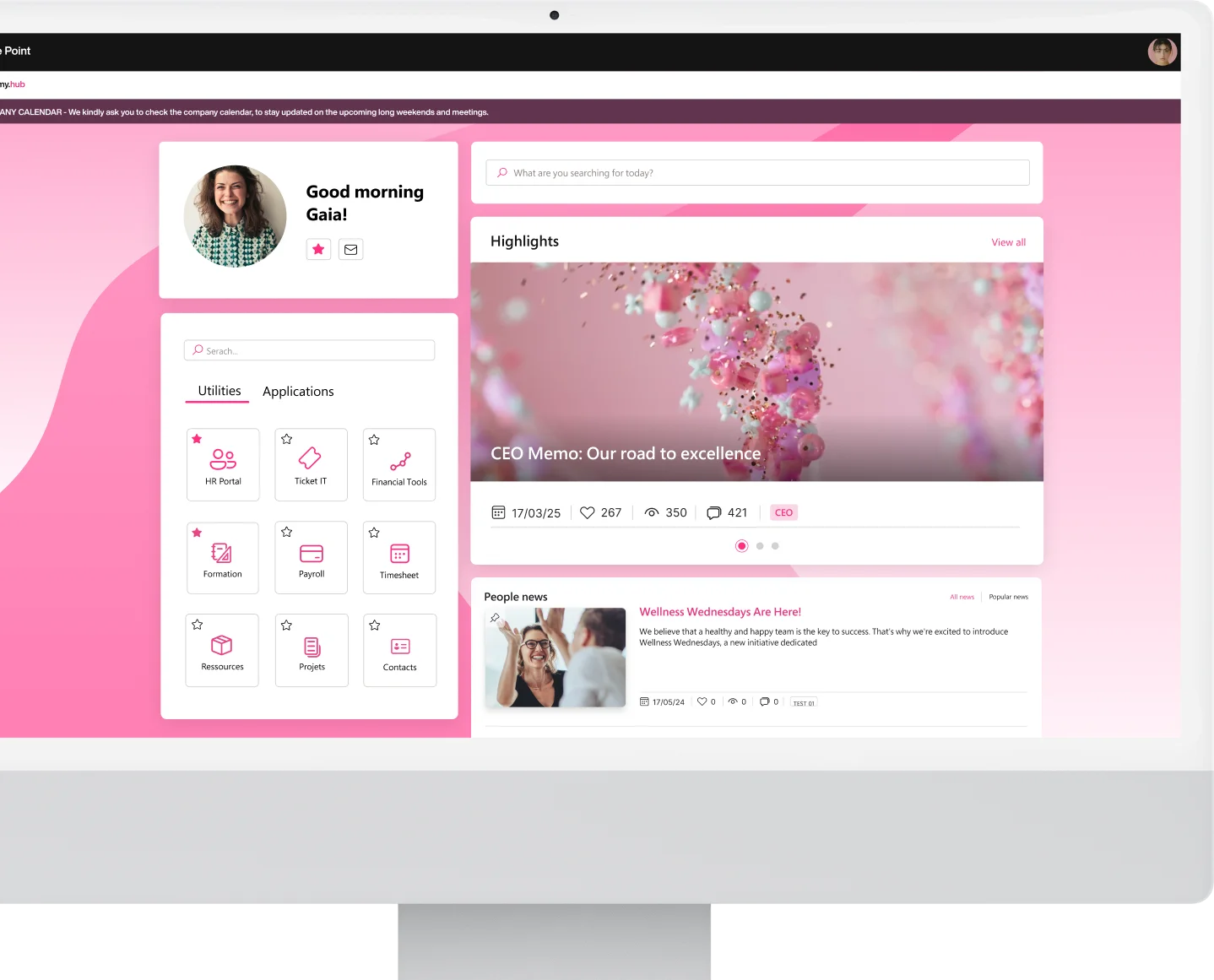
The intranet is a collaborative space designed to simplify access to company resources, documents, services, and applications.
If well designed, it serves as a hub for internal collaboration, allowing each department to share knowledge and useful files with their staff.
Centralizing this information is very important because instead of relying on countless communication channels, users can simply check the intranet pages to quickly find the content and answers they need.
And this is where FAQ pages come into play.
In a corporate context, FAQs are created to explain rules and procedures that often cause confusion, especially among new hires or following an organizational change. Unlike typical public website FAQs, internal company FAQs generally address questions about:
-
vacation and leave
-
security policies
-
benefits and welfare initiatives
-
use of work tools (digital and otherwise)
They are not intended for external clients but are focused on company dynamics and the needs of employees. Therefore, they are a tool that, if kept up to date and properly managed, can actively contribute to an organization’s growth.
They can support processes such as onboarding, improving the experience of new colleagues, or help reduce the risk of accidents caused by limited knowledge of machines, environments, or proper behaviors.
Having a centralized FAQ repository on the intranet helps standardize language and operational practices, ensuring that everyone has access to a single official source of information.
Maintaining an FAQ section means putting internal company know-how to good use: fewer mistakes and less time spent searching for answers, leading to a smoother workflow and greater employee autonomy.
However, company FAQs should not be seen as a simple archive of standard answers.
This section is not just a list of loosely compiled information; instead, it is a key element of the modern digital workplace, capable of providing precise answers to user questions, along with the most relevant resources and documents to fully understand the topics most searched for within the company.
Only in this way can FAQ pages deliver the greatest number of benefits.
First of all, they create an immediate consultation mechanism that reduces the workload of departments like Human Resources and IT.
When frequently asked questions are answered in a centralized area, people can find their way independently without having to contact department representatives each time. This also means that those who manage internal services can focus their efforts on more complex tasks, while FAQs handle the most recurring information requests.
Secondly, FAQs enable broader dissemination of policies and procedures.
With clearly summarized content, they help everyone in the company learn how to fill out each form, how to apply internal policies, or how to use company devices effectively without compromising security.
Third important point, the FAQ section offers continuous visibility on the topics that cause the most confusion. As a result, the organization gains valuable insights to improve internal communication, update the content available on the intranet, or expand its knowledge base with new in-depth resources.

But what are the features of a well-designed FAQ section?
To begin with, this area must ensure ease of use and clear presentation. It is therefore best to use a straightforward, simple, and practical language so that anyone can access the information without ending up even more confused.
Another useful tip is to use short titles for the questions, followed by more detailed explanations in the answers. This helps make navigation easier and allows the reader to quickly identify the information they are looking for.
Visual presentation also matters, so it’s worth spending some time creating a well-organized layout for end users. A section with an overly long list of questions can become overwhelming, so it’s better to split the content into multiple pages or categories, especially when covering topics of different kinds.
Keep in mind that the goal is to reduce search time.
Clearly, classifying questions by business function (such as HR, IT, Accounting) or by topic (benefits, safety, business travel) makes the information more accessible and easier to consult. If a user wants to learn about vacation management procedures, they can go directly to the relevant category instead of scrolling through unrelated paragraphs.
To further improve the user experience, filters can be added to narrow down the results based on specific topics or content types.
If a company is already using an intranet based on SharePoint Online, one option is to integrate features that allow these filters to be indexed, making FAQ content discoverable through global search.
But many other features can be implemented to simplify information retrieval, or may already be available in the FAQ pages provided by intranet.ai.
A Favorites system, for example, allows users to save the most useful FAQs and access them immediately from the intranet homepage. Similarly, the presence of analytical insights lets the company monitor in real time which questions are viewed the most, what gaps still exist, and what emerging trends are appearing.
All of this contributes to the creation of a highly effective company knowledge base, where each user can find the information they need in just a few seconds to perform their tasks.
See intranet.ai in action
A ready-to-use intranet on SharePoint Online, live in days. Book a free demo with our team.
Book a demoCompany FAQs on the intranet: best practices for implementation
Creating an effective FAQ section requires planning that involves the heads of each department. It is essential to define a method to identify the most common questions and organize a system for continuously updating the content, always leveraging available technology. In this article, the focus will be primarily on the company intranet based on SharePoint Online and Microsoft 365.
The first step is to analyze all possible questions that arise in everyday business life. At this stage, it is important to consult the most frequently contacted departments, such as Human Resources and IT, since they usually receive the majority of employee inquiries.
However, do not overlook other offices, such as Finance or Legal, as each may deal with specific procedures that are more difficult to grasp.
Once the initial list of questions is collected, it is helpful to check if they can be grouped into broad topics, such as “leave and vacation,” “security policies,” or “onboarding procedures.” This mapping provides a clearer overview of the content to be included in the FAQ section, helping determine whether to manage them on a single page or divide them into multiple categorized subpages.
As mentioned earlier, content writing should be based on accessible language. Using technical jargon or department-specific terms should be avoided whenever possible or always accompanied by brief, explanatory descriptions so that all users can understand the answers.
Regarding the answers themselves, remember they must be concise, accurate, and practical.
To create the FAQs, you can follow a six-step process:
-
Collect questions: build an initial list through interviews or internal surveys to identify the most common questions.
-
Organize by topic: define categories and subcategories while avoiding too many hierarchical levels.
-
Write the answers: provide clear explanations and include any links or references to official documents, procedures, or support contacts.
-
Review and validate: have department representatives verify the accuracy and completeness of the FAQs relevant to their area.
-
Publish on the intranet: upload the content to dedicated pages on SharePoint or similar platforms, configuring search and categorization options.
-
Collect feedback: gather comments and suggestions, and update the content based on actual employee needs.
Once these FAQ pages are created, we cannot forget about them or leave them untouched. FAQs must always reflect the current state of internal processes and active policies. Therefore, if policies change or new procedures are introduced, the relevant section must be updated promptly.
To ensure that questions and answers are always up to date, it may be helpful to establish a schedule for each department to review the published information. This creates review cycles that allow for corrections or additions to the FAQs based on internal changes.

As mentioned earlier, a well-organized FAQ section should not be just a static archive of answers but a dynamic tool that integrates seamlessly with an ecosystem like Microsoft 365. The ability to connect tools such as SharePoint, Teams, and Power Automate can turn FAQ management into a more interactive process that stays up to date automatically.
Let’s take SharePoint Online as an example: this platform is the core of document management within the intranet. Creating dedicated FAQ pages allows information to be organized in a way that makes it easier for users to find what they need.
With a collapsible section, questions can be grouped by topic, making navigation more efficient. Additionally, the system can automatically highlight the most viewed FAQs, giving quick access to the most relevant topics.
If SharePoint provides the structure, Microsoft Teams adds interaction.
With Teams, you can add the FAQ section to a channel (if hosted on a SharePoint site) or integrate a bot built with Power Virtual Agents or third-party applications that can answer questions it has been trained on.
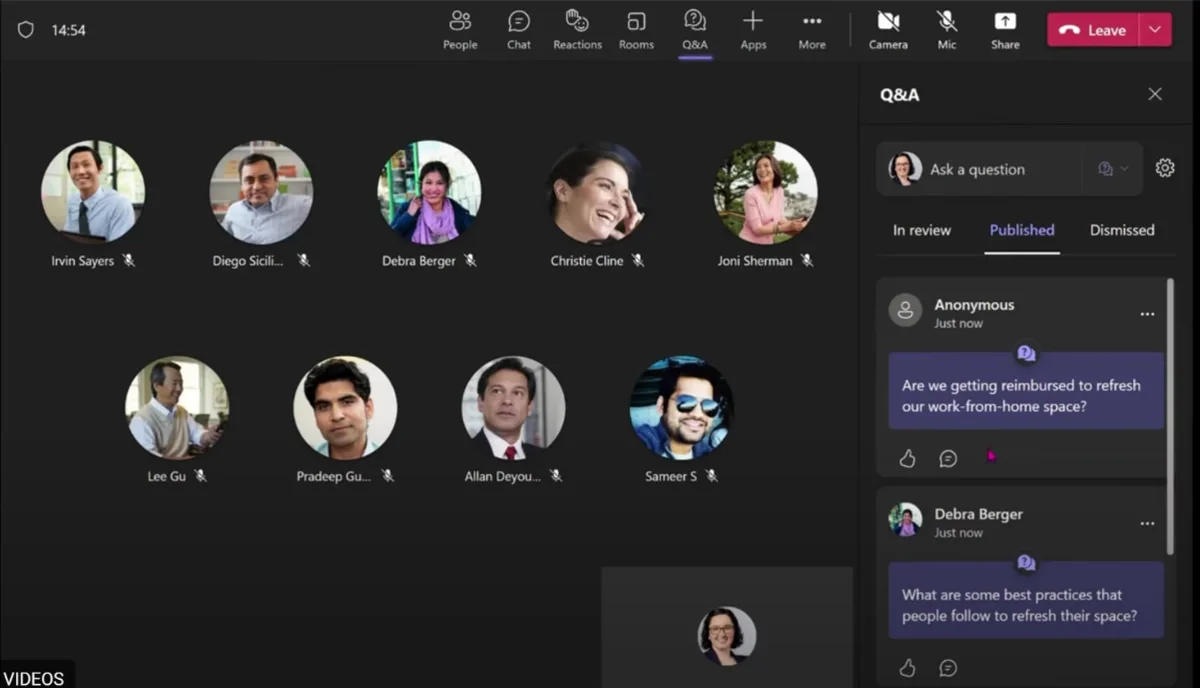
In addition, you can use the Questions and Answers (Q&A) feature to manage FAQs in real time during a meeting and allow participants to share doubts, make suggestions, or propose new ideas without interrupting their colleagues.
What makes everything even more effective is automation.
With Power Automate, the company can reduce manual workload and ensure that any change is promptly communicated to the people responsible for the knowledge base and, in turn, for the FAQ pages.
Whenever a new question is published or updated, the system can send an automatic notification on Teams. However, this is only possible if a preliminary configuration has been set up with Power Automate and if the FAQ storage is in a compatible environment, such as a SharePoint list or document library.
Additionally, Power Automate makes it possible to generate regular reports to analyze which FAQs are accessed the most and which are less useful, allowing for continuous improvement of the content.
If needed, an approval flow can also be set up so that each new FAQ is reviewed by a designated person before being published.
In addition to the “traditional” Microsoft tools we just listed, it is worth exploring some of the newer products gaining traction in companies that can contribute to building FAQ pages.
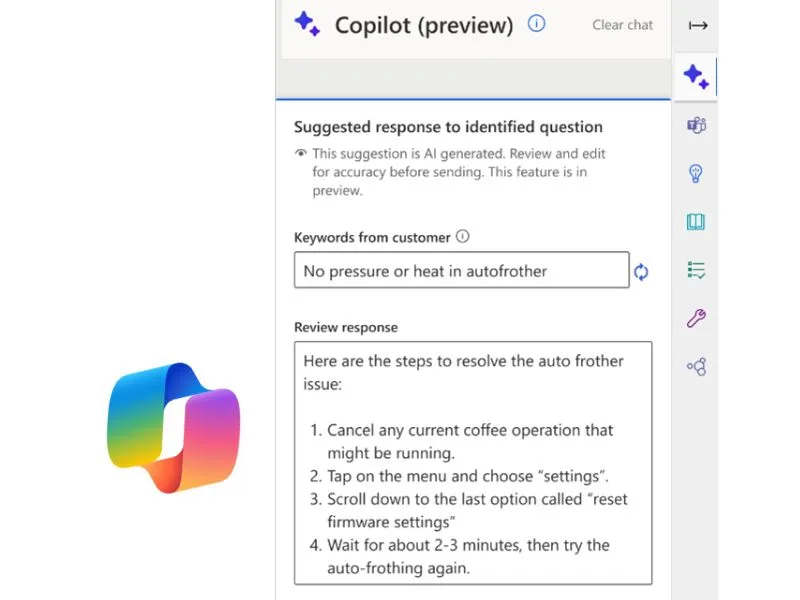
Let’s start with Copilot, the AI assistant integrated into Microsoft 365 applications.
When it comes to company FAQs, Copilot can analyze user questions and provide relevant answers by drawing from the organization’s vast collection of documents and internal data. For example, if a colleague is looking for information about a specific procedure, Copilot can guide them to the most relevant content, saving time on manual searches.
Power Virtual Agents, mentioned earlier, is useful for creating smart chatbots without the need for coding.
By integrating a chatbot into the FAQ section, users can ask questions in natural language and receive answers based on the data shared with the bot during its training. This avoids the need to scroll through the entire section in search of specific information. For example, a user might ask, “How can I request time off?” and the chatbot would immediately provide the detailed procedure.
Let’s close this overview with two additional tools that can support, but not replace, a dedicated solution for managing company FAQs: Microsoft Sway and Microsoft Forms.
Microsoft Sway, as a tool designed to create visual and interactive presentations, can be used to make FAQs more engaging, for example by including explanatory videos or infographics about a new company policy.
However, FAQs presented with Sway remain static and do not offer quick search or automatic update features, unlike more suitable tools such as a SharePoint list or a chatbot.
Microsoft Forms, on the other hand, does not allow you to directly display FAQs, but it can be useful for collecting frequently asked questions from users or feedback on the clarity of the information provided on the intranet. It can also be used to create short quizzes based on the FAQs to check content understanding.
The intranet.ai solution for creating smart FAQ pages
The FAQ section in an intranet based on SharePoint Online can make a significant leap in quality thanks to the solutions offered by intranet.ai. The goal is to create an intuitive and interactive experience by integrating features developed by our team for information search, data analysis, and task management, also powered by built-in artificial intelligence.
Our FAQ pages are designed to enhance the knowledge already present within your company and turn it into a resource available to all colleagues.
One of their key features is the ability to centralize information relevant to multiple departments in a single interface. And that’s not all.
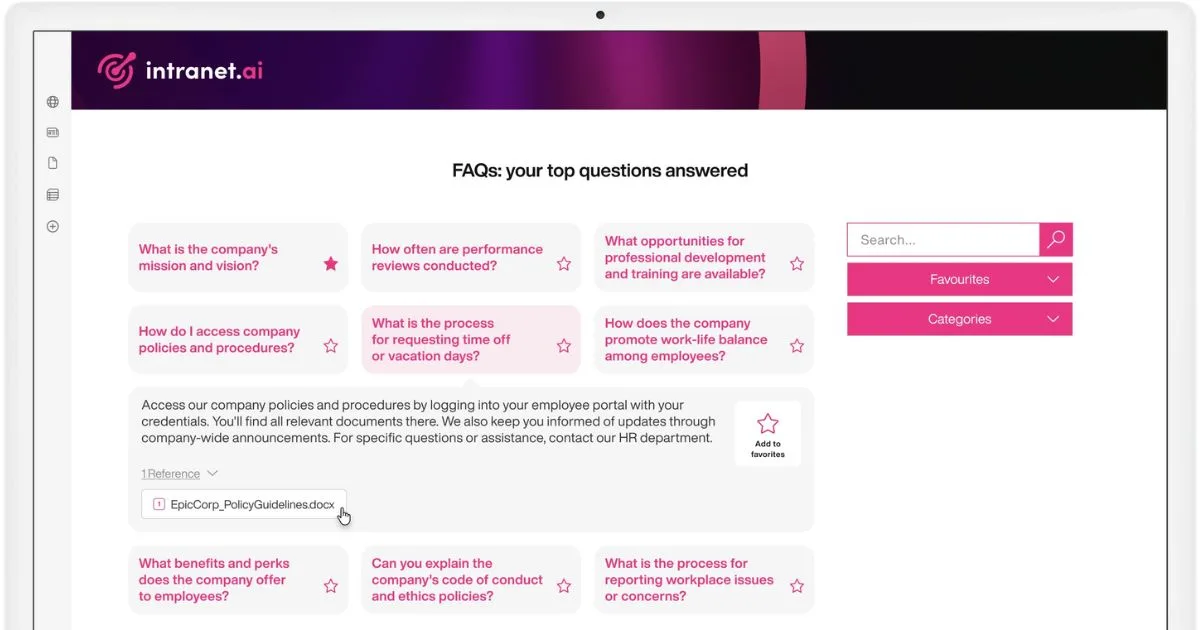
The FAQ pages created with the intranet.ai solution guide users clearly: questions are categorized by topic or by functional area, making them easier to browse.
With a design focused on accessibility, the page structure features well-organized lists that are easy to scroll through, with the option to expand individual answers or access additional resources such as internal documents or reference contacts.
Another strength is the ability to save the most useful answers as Favorites. This is an important feature for those who need to consult the same procedures multiple times or want to keep specific task-related instructions easily accessible.
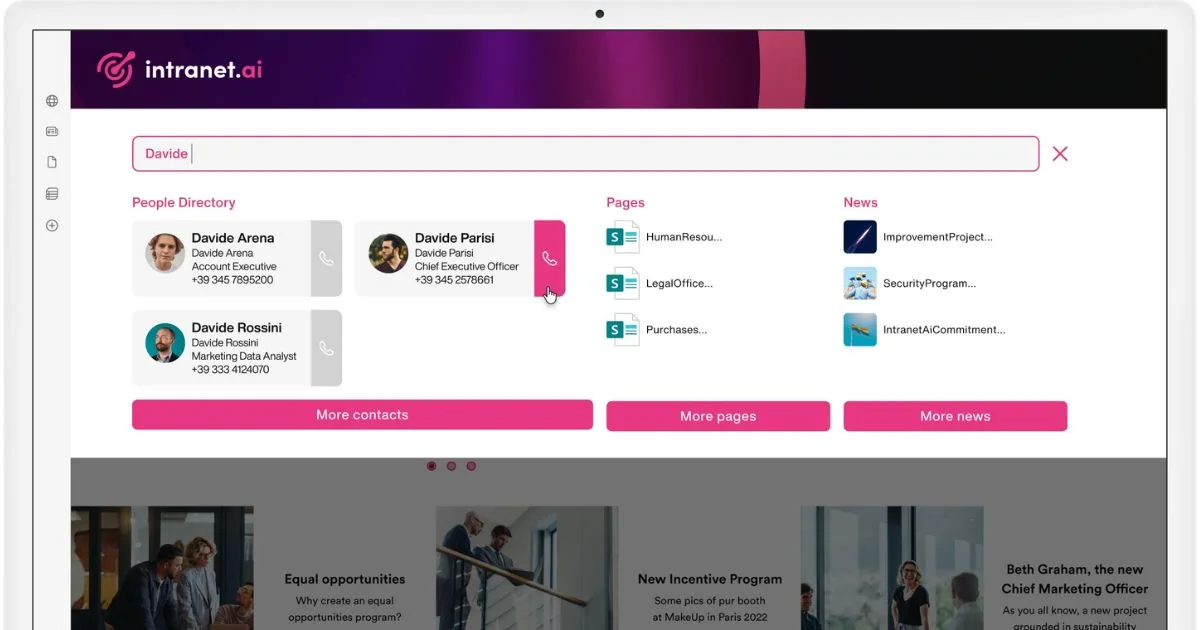
Thanks to integration with the Advanced Search, users can enter keywords or natural language phrases to retrieve the most relevant information through our AI-powered search system. This is useful when the user does not know the category of their question or when content is frequently updated and search indexes must remain in sync with the latest versions.
This integration also enables the use of advanced algorithms to link the user’s query to all related resources within the intranet: not only the answer in the FAQs, but also additional pages, documents, announcements, and contacts from the People Directory.
The result is a system of cross-navigation that allows users to effectively interact with the wealth of data stored in the intranet and in the integrated digital workplace, all from a single interface.
Another integration worth mentioning is the one with Intranet Analytics, the component we developed to analyze intranet usage data, going beyond the limitations of SharePoint and its pages, including FAQs.
Companies can generate dynamic reports, based on Power BI, with valuable insights into the most viewed questions, consultation peaks during specific periods, and content areas that may be underrepresented.
Finally, the artificial intelligence integrated into the intranet.ai solution makes it possible to quickly generate new FAQs by extracting information directly from company documents.
This method combines the use of advanced language technologies with the internal knowledge of each organization to provide answers that are always up to date, aligned with company policies, and genuinely helpful to colleagues.
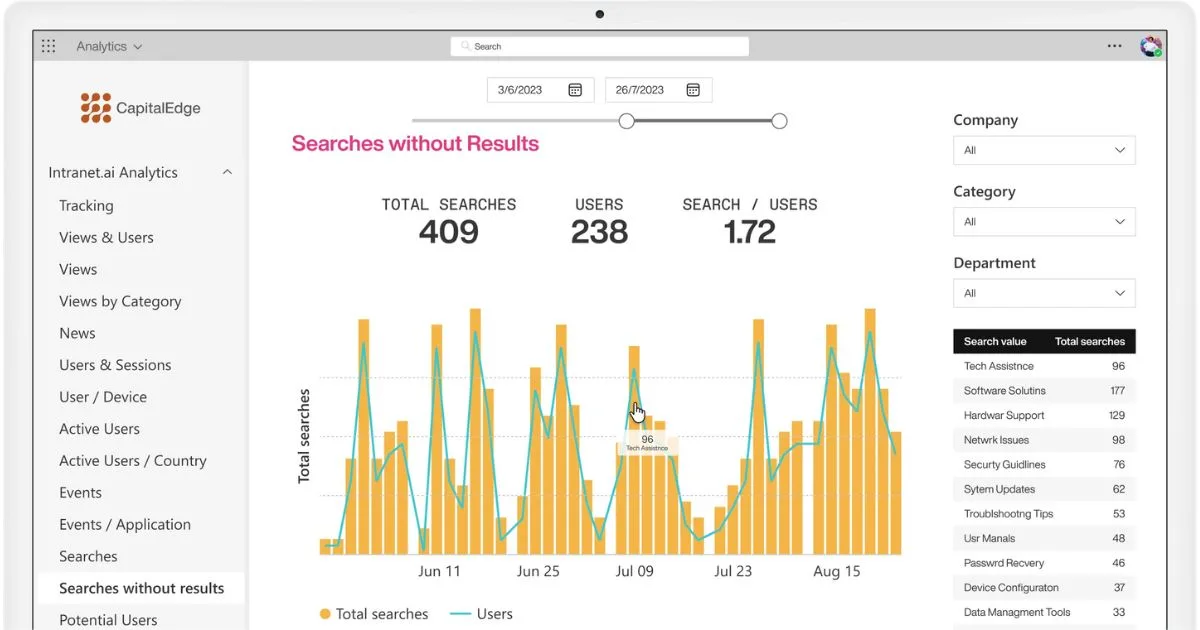
Analysis of search data in intranet.ai’s SharePoint intranet
This is how company FAQs, designed according to the criteria and expertise of our specialists, form a complete ecosystem capable of centralizing the most requested information, supporting the exchange of updates, and ensuring that even data analysis features can help reduce the workload of each department. Not just a simple collection of questions, to go back to where we started, but a network of knowledge that helps improve collaboration and autonomy for all employees, from new hires to the most experienced managers.